Body
How To Find the BitLocker Recovery Key Using Microsoft Entra

Description
This KB gives instructions on how to find a devices BitLocker Recovery Key using Microsoft Entra
Criteria
Help Desk access to Microsoft Entra
Estimated Time to Complete
This task should take about 2- 3 Minutes - If all goes according to plan (encountering no problems). Do not feel pressured to complete the task in this amount of time.
Resolution
To find the BitLocker Recovery Key, please follow the steps below.
The user will have the Alphanumeric Bitlocker 32-digit Key ID on their screen.
The format will be XXXXXXXX-XXXX-XXXX-XXXX-XXXXXXXXXXXX
|
Browse to https://entra.microsoft.com/#home
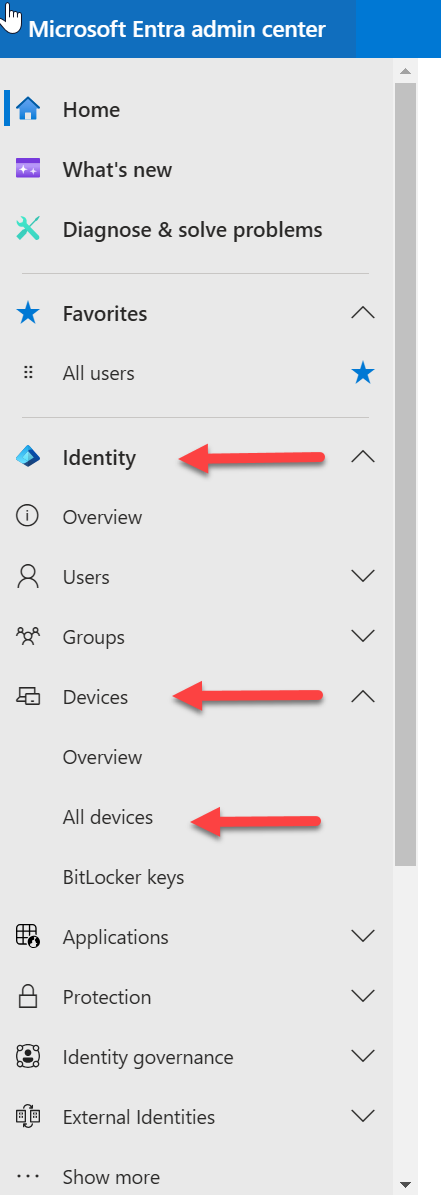
- Click Identity
- Click Devices
- Click All devices
- Search for the device ID (Device name or PC name)
- Click the device ID
- Click BitLocker keys (Preview)
- Click Show Recovery Key
|
 |


***** You have successfully found the BitLocker Recovery Key! *****